
FREE AI Tool By Google is Better than Paid AI Tools | Google AI Studio for Researchers

Most researchers waste months searching for the “perfect” AI tool—only to realize later that no single tool can handle every stage of academic writing. From brainstorming and literature review to structuring chapters and explaining complex diagrams, research demands a set of tools, not just one. Surprisingly, one of the most powerful tools in this set is completely free—and often more capable than many paid AI platforms.
That tool is Google AI Studio.
While many researchers rely heavily on paid AI tools, Google AI Studio quietly offers advanced academic support that rivals, and in many cases exceeds, premium alternatives. In this article, we take a deep look at why Google AI Studio has become a daily-use research companion for serious scholars.
Why Researchers Should Stop Relying on a Single AI Tool
Academic writing is not a single-task activity.
It involves:
Idea generation and brainstorming
Literature review from multiple research papers
Understanding complex figures, equations, and diagrams
Structuring proposals, theses, and journal articles
Explaining methodologies and identifying research gaps
Expecting one AI tool to manage all these tasks perfectly is unrealistic. Instead, researchers should build a toolset that includes both paid and free AI tools. Within this set, Google AI Studio stands out as a core, free, and highly capable option that supports researchers at almost every stage of their academic journey.
What Is Google AI Studio?
Google AI Studio is an advanced AI interface powered by Google’s Gemini models. It allows researchers to interact with different AI models, upload multiple files, connect to Google Drive, analyze images and screenshots, summarize YouTube videos, and develop structured academic content—all from a single interface.
Unlike many tools that restrict features behind paywalls, Google AI Studio offers these capabilities for free, making it especially valuable for students, early-career researchers, and academics working under budget constraints.
Exploring the Interface and AI Models
When you open Google AI Studio, you are presented with a clean and intuitive interface.
Researchers can select from multiple AI models, including:
Gemini Pro (Preview) for advanced academic responses
Gemini Flash for faster outputs
Image generation models for visuals and illustrations

This flexibility allows researchers to choose the model that best fits their task—whether they need deep theoretical explanations or quick summaries.
Unlimited File Uploads and Literature Review Support
One of the most powerful advantages of Google AI Studio is its multi-file upload capability.
While many AI tools limit uploads in their free versions, Google AI Studio allows researchers to:
Upload multiple research papers
Ask questions across all uploaded documents
Extract key points from specific studies
Write literature reviews based on selected papers

Researchers can also connect Google Drive directly, enabling seamless access to stored PDFs without switching platforms. This single-interface workflow saves time and reduces cognitive overload during long research sessions.
YouTube Video Summarization for Academic Learning
Google AI Studio offers a rare feature not commonly available even in paid tools: YouTube video summarization.
By simply pasting a YouTube URL, researchers can:
Generate summaries of lectures, seminars, or conferences
Extract key concepts from educational videos
Convert video content into structured notes

This is especially helpful for students and researchers who rely on online academic talks, recorded workshops, and explainer videos.
Screenshot and Image-Based Academic Explanation
Understanding complex diagrams, chemical equations, and flowcharts is often one of the hardest parts of research. Google AI Studio solves this problem with its screen capture and image explanation feature.
Researchers can:
Take screenshots of research papers, figures, or equations
Upload the image directly into the prompt
Ask for in-depth explanations of the visual content

For example, when analyzing chemical pathways or industrial processes shown in a research figure, Google AI Studio can break down each step clearly and academically. This feature is especially valuable for STEM researchers dealing with dense visual data.
Audio and Screen-Based Interaction
Another advanced capability is audio and screen-based interaction. Researchers can record their screen or explain their problem verbally, then ask Google AI Studio to respond based on that input.
This is particularly useful when:
You feel stuck and cannot phrase your question clearly
You want real-time brainstorming support
You need clarification while reviewing a document
This interactive approach feels more like collaborating with a research assistant than using a traditional AI chatbot.
Research Outline and Proposal Development
Google AI Studio excels in structuring academic documents.
Researchers can use it to:
Develop full research proposals
Create outlines for theses, dissertations, or review papers
Identify research gaps based on defined criteria
Generate research questions and methodologies
You can even specify:
Total word count
Chapter-wise word distribution
Key focus areas for each heading and subheading
The AI then provides a structured outline with recommended word limits and content direction—making academic writing far more manageable.
Academic Quality Compared to ChatGPT
When comparing responses from Google AI Studio and ChatGPT, many researchers notice a clear difference.
Google AI Studio tends to provide:
More academic and structured responses
Clear alignment with research language
Less generic phrasing
Stronger focus on methodology and theory
This makes it particularly suitable for formal research writing rather than general content creation.
Visual Creation and Image Transformation
Beyond text, Google AI Studio also supports image generation and transformation.
Researchers can:
Generate professional headshots
Create academic visuals based on prompts
Convert hand-drawn diagrams into clean 3D images
Maintain labeling and structural accuracy
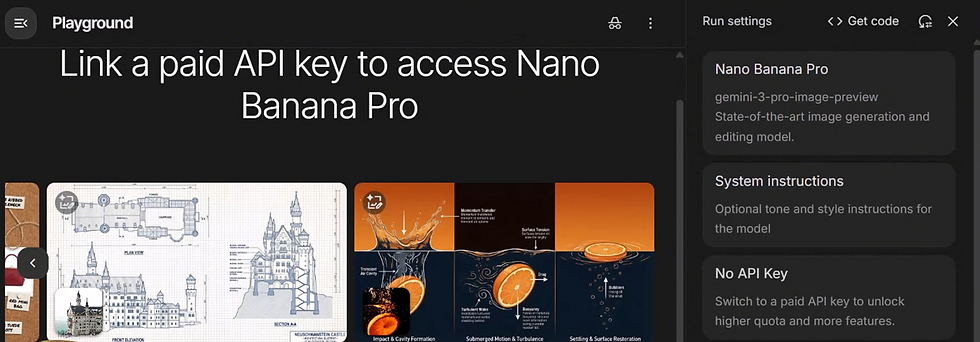
This is extremely useful for preparing figures, workflows, and conceptual diagrams for publications or presentations.
Coding, Flowcharts, and Workflow Design
Google AI Studio can assist with:
Developing code snippets
Designing research workflows
Creating logical flowcharts
Supporting technical documentation

Researchers can then export this content to other tools for final design or visualization.
Conclusion: Why Google AI Studio Deserves a Place in Every Researcher’s Toolkit
Google AI Studio proves that free does not mean limited. With its advanced academic responses, unlimited uploads, image and screen analysis, proposal structuring, and visual generation capabilities, it outperforms many paid AI tools used by researchers today.
Rather than replacing other AI tools, Google AI Studio complements them—acting as a central hub for brainstorming, analysis, and academic structuring. For researchers who want efficiency without compromising academic quality, this tool is hard to ignore.
If you are serious about improving your research workflow without increasing your expenses, start exploring Google AI Studio today. For more in-depth guides, tutorials, and ethical AI usage for research, follow Scientific Pakistan and stay connected with practical academic insights designed for researchers like you.


Me pareció interesante el enfoque utilizado para explicar los datos. Cuando se busca resultado loteria, es conveniente encontrar una página que permita distinguir rápidamente cada jornada y comprobar la información sin complicaciones innecesarias
This post is so helpful! Google AI Studio sounds amazing for research. Speaking of tools, I often use a bold text generator copy and paste to make my social media posts stand out. It's cool how free tools can be so powerful!
In Build Now GG, I experimented with max sensitivity just for fun and instantly regretted it. My crosshair looked like it was possessed.