
SciSpace AI Agent Can Review, Edit & Reply to Comments Automatically in MS Word Files

The process of editing a research paper or thesis can be tedious and time-consuming, often involving manual tracking of changes and repetitive copying and pasting between ChatGPT and Microsoft Word.
Although general AI tools are good at producing text, they aren't always as effective when it comes to keeping documents in the right structure and responding to feedback from reviewers. But the new SciSpace AI Agent can make this easier by automating your editing, responding to document comments, and even conducting thorough research while maintaining trackable, professional changes.
Here is the Traditional AI-assisted editing workflow in which you must manually copy/paste text from ChatGPT to comments and then to Microsoft Word.

Why the Traditional Editing Workflow is Failing You
Most researchers find it difficult to overcome:
The Copy-Paste Loop: Text is copied to an AI to be rewritten and then manually re-formatted in Word.
Manual Track Changes: Hours spent individually responding to each individual comment or "fix" from a supervisor.
Citation Chaos: Losing track of references when sections are rewritten.
You can now upload your MS Word file, and the AI will make edits, citations, and respond to comments all in one place, within the SciSpace AI Agent.
Step 1: Upload and Activate the Agent
The following is how to enable the SciSpace Office Skill to start editing documents with AI.
Access it here: SciSpace
Code: AORIZ35: 35% off the Max plan (40000 credits)
The process starts with uploading your MS Word draft to SciSpace. In place of a basic chat interface, you launch the SciSpace Office Skill. This agent is specially created to comprehend the structure of a document, find paragraphs of interest, and handle track changes as a human editor.

Step 2: Addressing Comments and Automated Rewriting
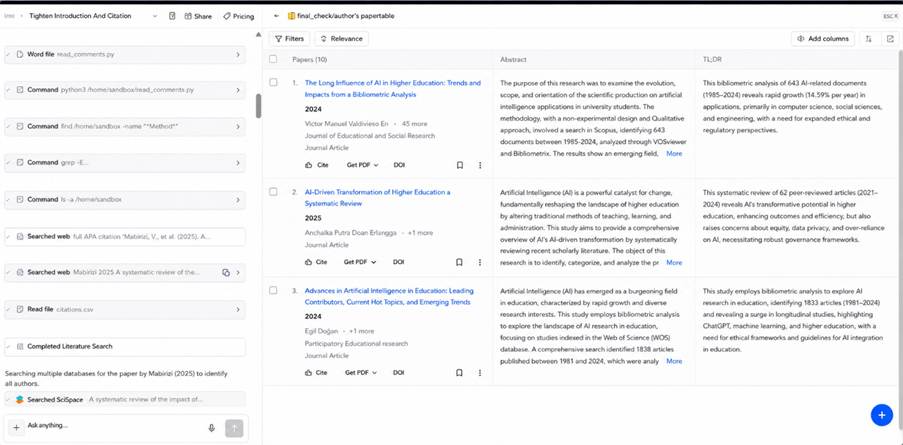
You can perform complex, multi-step instructions for the Agent, which might take hours to do by hand, but can be done in a matter of minutes with the Agent. SciSpace AI Agent working on a multi-step editing task for a Microsoft Word manuscript.

"Tighten the introduction and correct citation formatting."
"Rewrite the Methods section in the active voice while keeping track changes on."
"Answer the comments from my supervisor regarding the research gap using credible literature."
The Agent scans millions of papers across databases like Google Scholar and Mendeley to ensure every edit is supported by reliable academic evidence.
Step 3: Review Tracked Changes
Once the SciSpace AI Agent completes the requested task, it automatically opens your manuscript in a built-in MS Word-compatible editor with Track Changes enabled.
All the changes made in the document (such as inserted text, deleted text, updated citations, and formatting changes) are clearly marked so you can see each change just like you would in Microsoft Word.
You can always see what the AI suggests and decide whether to Accept or Reject the changes as you work through the process until you've finished your document.

Beyond Editing: Using "My Library" for Research Insights
The SciSpace AI Agent is not only an editor, but it is also a research collection assistant.
Build Your Library
Place a folder of reference papers in My Library. To upload and organize research papers in the SciSpace My Library workspace.

Locate Research Gaps
Ask the Agent:
"Identify the research gaps across all papers in this folder."
Automatic Literature Synthesis
The Agent reads the papers you upload to create a summary or literature review, with correct in-text citations.

Benefits of the SciSpace AI Agent
Automates repetitive writing tasks and saves days of manual editing.
Make edits in your document, maintaining formatting, while keeping track of the changes.
Knows how to respond to supervisor comments based on evidence in millions of research papers.
Streamlines copying and pasting AI-generated content into Microsoft Word.
Ensures that your manuscript is consistent in the way it references.
How to Get Started for Free
1. Access SciSpace
Visit the SciSpace website.
2. Upload Your Word Document
Open the Chat with PDF/Doc section and upload your manuscript.
3. Prompt the Agent
Use a prompt such as:
"Review my writing and address all comments using track changes."
4. Download Your Updated Document
Review the suggested edits, accept or reject the changes, and download the polished document in .docx format.
Conclusion
Endless manual editing of academic writing is a thing of the past. The SciSpace AI Agent streamlines your research process by automatically reading manuscripts, editing text and content, handling reviewer feedback, keeping document formatting intact, and handling track changes in the same workspace. From a PhD student to a researcher to a faculty member, this AI-driven assistant can save you time on research and less time on the revision of documents.
Looking to save hours of editing work and go all the way?
Want something more hands-on with AI tools for researchers?
Learn how to publish scientific research, write academic papers, conduct systematic reviews, use AI tools, and find career opportunities in scientific research with Scientific Pakistan.


I prefer balanced discussions about the v3 game app apk rather than exaggerated opinions. Every game can have both positive and negative experiences, so discussing things honestly and based on personal experience makes the conversation much more useful.
I’m seeing goa game register mentioned in a few places, so I wanted to check it out. Before using it regularly, can anyone confirm if it works properly on Android devices and whether it requires any verification?
When Drift Hunters gets serious, you stop seeing the corners and cars; you only feel the throttle, tire smoke, and rhythm of every slide.